Inbox visibility: who on your team sees what
Two settings decide who sees which referrals: one your practice sets for its practitioners, and one anybody with practice-wide access chooses for their own workspace. Here is what each one changes, who keeps the whole inbox, and what to check when a colleague can see a referral you cannot.
On this page
Browse categories
What the practice setting decides
In some practices each clinician runs their own referrals; in others the front desk works one shared list and hands things out. Inbox Visibility is the setting for that choice, and it applies to your whole practice.
It has two options:
Own referrals onlyshows a practitioner the referrals addressed to them or assigned to them, and nothing else. This is the default.All practice referralsshows every practitioner every referral the practice receives.
The setting narrows one role: a Practitioner. It takes nothing away from an Owner, an Administrator, or a Coordinator / Front Desk. An owner or administrator who wants a narrower view sets that for themselves, on their own account, further down this guide.
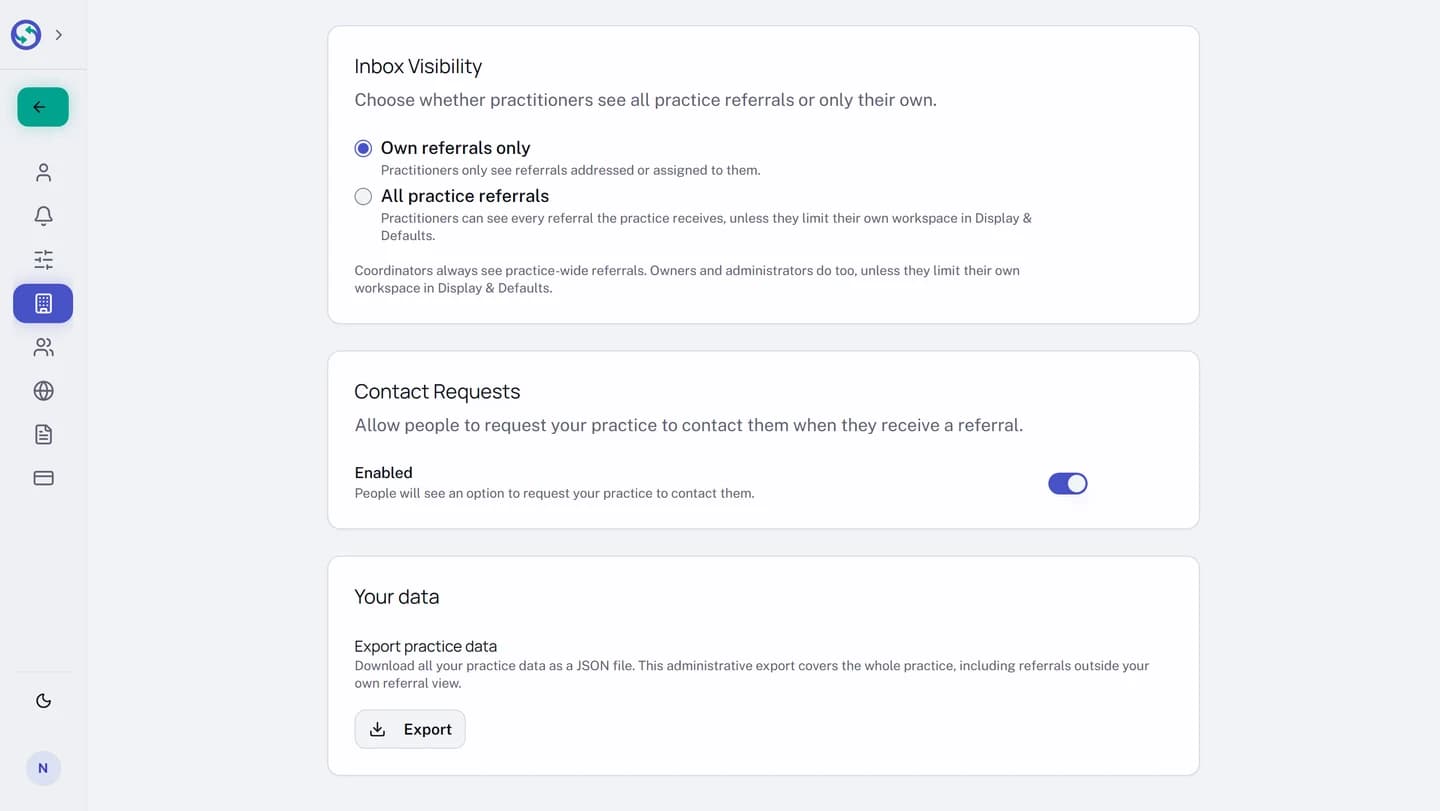
Change the practice setting
- At the bottom of the sidebar, open the menu showing your name.
- Select
Settings. - In the settings sidebar, under
Practice, openGeneral. - Scroll to the
Inbox Visibilitysection. - Select
Own referrals onlyorAll practice referrals.
The choice saves as you select it; there is no save button. The change is recorded in your practice's activity log.
What "own referrals only" means for a practitioner
Under Own referrals only, a practitioner sees a referral in either of two cases:
- The referring practice addressed it to them by name.
- Somebody at your practice assigned it to them. See Assign a referral to a clinician.
Everything else your practice receives is outside their view.
The narrowing runs all the way through the product, not only down the list:
Receivedshows their referrals only.- A colleague's referral has no page for them: opening its address lands on a
404. - The count on the
Receivedentry and the numbers onOverviewcount their referrals only. - A thread on a colleague's referral is not readable.
- The
Received byfilter is not offered, because there is only one desk in view.
What "all practice referrals" means
Under All practice referrals, a practitioner reads the same inbox as the front desk: every referral your practice was sent, whoever it was addressed to. In a practice with more than one team member they also get the Received by filter, so they can still narrow the list to one colleague.
Assignment keeps working, but it stops deciding who can see a referral and goes back to saying whose desk it is on.
A practitioner who would rather work a shorter list can narrow their own workspace, which changes nothing for the rest of the practice.
Limit your own workspace to your own referrals
The whole practice inbox is not always the list you want to work. Anybody with practice-wide access can narrow their own: an Owner, an Administrator, and, while the practice is set to All practice referrals, a Practitioner. It changes what you see and nothing else. Your colleagues keep the referrals they had, and your role keeps everything it could do.
A Coordinator / Front Desk has no such setting. Neither does a practitioner whose practice is set to Own referrals only: that workspace is already narrowed, and their Display & Defaults page has no Referral Visibility section.
- At the bottom of the sidebar, open the menu showing your name.
- Select
Settings. - In the settings sidebar, under
Preferences, openDisplay & Defaults. - Scroll to the
Referral Visibilitysection. - Select
My referrals only.
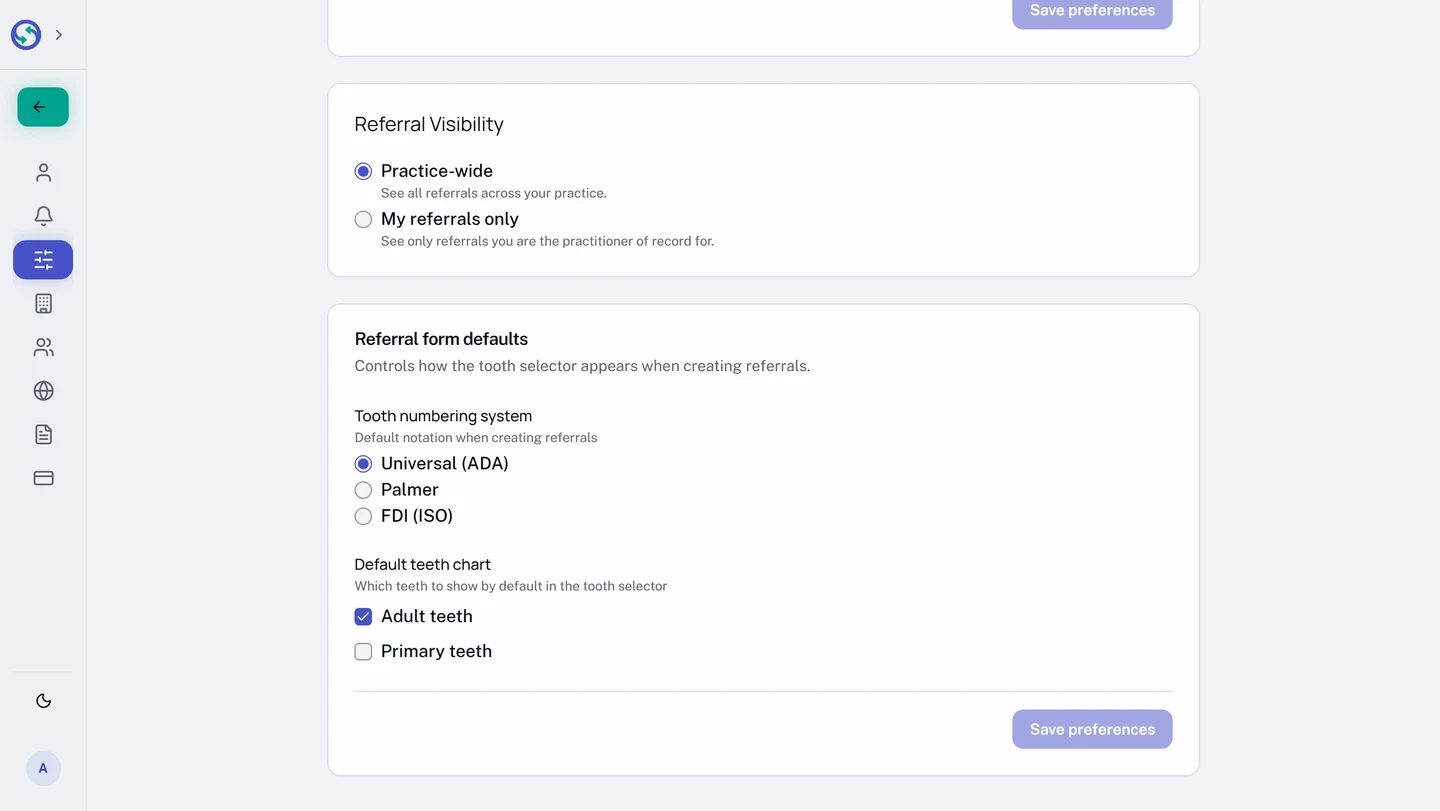
It saves as you select it. From then on your workspace holds your own referrals:
- The referrals that name you as practitioner of record. Sending a referral in a colleague's name does not make it yours.
- The received referrals addressed to you by name or assigned to you.
- Drafts that name you, and drafts that name nobody yet. A draft naming a colleague leaves your view.
Everything else your practice sends and receives goes out of view, along with its conversations and its share of the counts on Overview and Received. Nothing is deleted, and it all comes back when you select Practice-wide again.
While My referrals only is selected, you cannot prepare a draft or send a referral in a colleague's name. Select Practice-wide first to do that work.
An Owner and an Administrator keep the practice data export either way. That export covers the whole practice, including referrals outside their own view.
Syncroly moves you back to Practice-wide by itself only when it has to: your role changes to one that has no such setting, or your practice is left with nobody else on the practice-wide view. The Referral Visibility section then says when that happened and why, and keeps saying so for two weeks. Select My referrals only again if you still want it; it does not come back on its own.
Who sees the whole practice inbox
The practice setting narrows practitioners and nobody else. An Owner, an Administrator, and a Coordinator / Front Desk keep the whole practice inbox whatever it is set to.
The one thing that narrows an owner or administrator is their own choice, on their own account. A Coordinator / Front Desk cannot make that choice, so a coordinator sees the whole practice inbox either way.
If your practice is worried about who reads patient details, the role you give somebody is the decision that matters, not either of these settings.
Neither setting changes who may send a referral. If that is the question you came with, see Send a referral for clinician review.
A referral a colleague can see and you cannot
Two settings can explain it, so check your own first. Open Display & Defaults and look at the Referral Visibility section: if My referrals only is selected, select Practice-wide and your practice's referrals come back.
If you are a Practitioner and you have turned nothing on, your practice is most likely set to Own referrals only. That is the default, and it is not a fault or an error on your account.
- Ask your practice owner or administrator which option
Inbox Visibilityis set to. - If the referral needs to be yours, ask them to assign it to you. That puts it in your inbox without changing the setting for everyone.
Before assuming visibility is the reason, rule out the ordinary ones. A referral can be missing because it is filtered out of the default view, because it was archived, or because the patient has not shared it with your practice yet. The checklist in Your received inbox, and finding a referral you can't see walks all four in order.