Assign a referral to a clinician
Assigning hands a received referral to one clinician at your practice, so the rest of the team can see whose desk it is on. Here is who can assign, what the assignee sees, and when Syncroly assigns for you.
On this page
Browse categories
What assigning does
A referral arrives for your practice, not for one person. Assigning names the clinician it belongs to.
Once a referral is assigned:
- Its row in
Receivedcarries anAssigned toline naming the clinician, for everyone at your practice who works the practice-wide inbox. - Anyone else working that inbox no longer sees it marked
New. - Notifications for messages on the referral's conversation go to the assignee. Your front desk keeps receiving them either way.
- The referral's activity history records
Assigned toand the name.
Assigning does not change the referral's status, and it does not change what the referring practice sees. Their timeline shows what happened to the patient, not how your practice divided the work.
Who can assign
Assigning a referral by hand takes a role that manages the practice inbox.
Owner,Administrator, andCoordinator / Front Deskcan assign.Practitionercannot. A practitioner works their own referrals and cannot hand work to a colleague.
The Assign control is not on the page for anyone who cannot use it, rather than showing and then refusing.
Assign a referral
- In the sidebar, open
Received. - Open the referral you want to assign.
- In the row of buttons beside the patient name, select
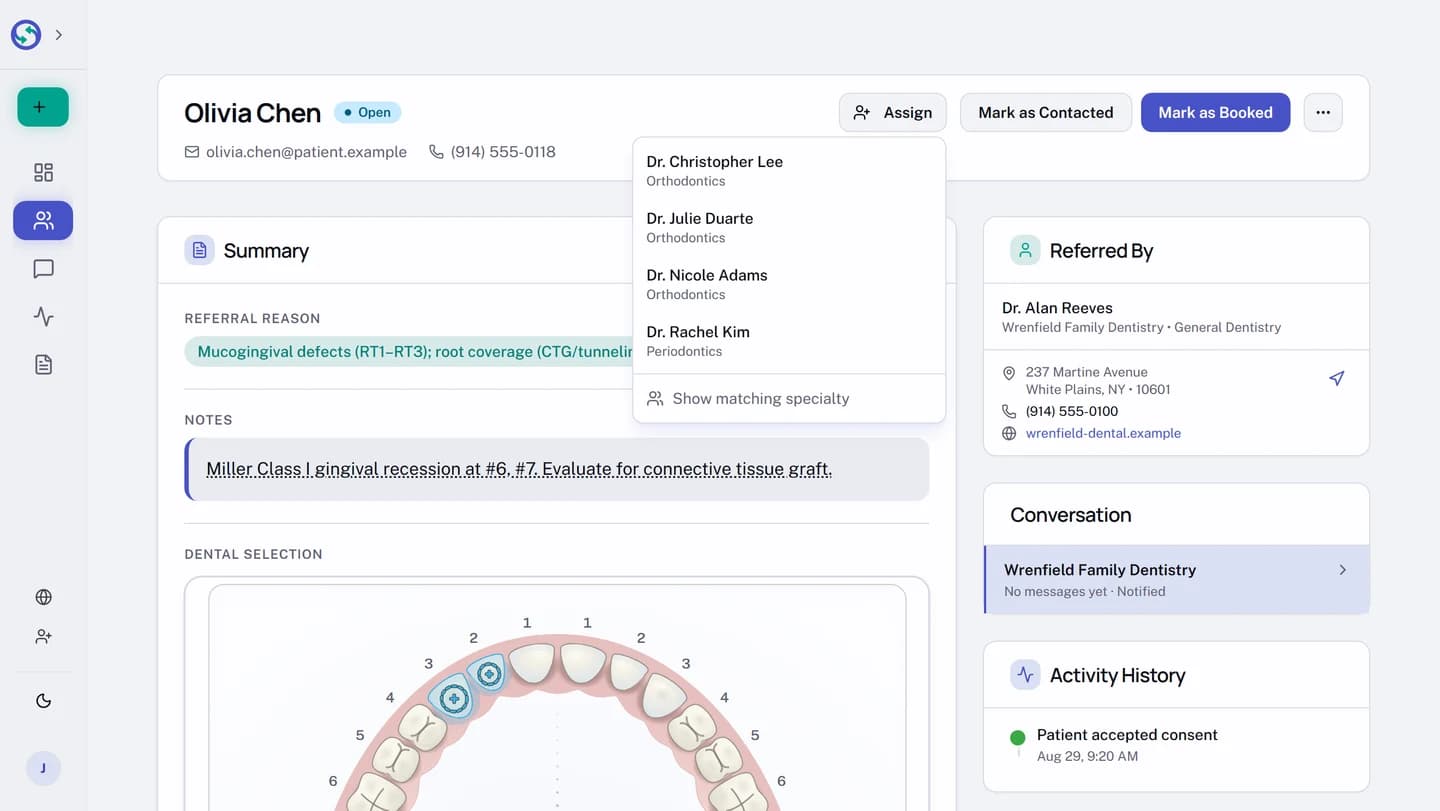
Assign. - In the list that opens, select the clinician the referral belongs to.
The list opens on the clinicians whose specialty matches the referral. To see everyone, select Show all team members; to go back to the shorter list, select Show matching specialty.
The names come from your practice's clinician profiles, so a practice with no clinician profile set up has nobody to assign to and no Assign control on the page.
When Syncroly assigns for you
Some referrals arrive already assigned, with no action from anyone at your practice.
When the referring practice addresses a referral to exactly one clinician at your practice by name, Syncroly assigns it to that clinician as it is sent. That is why a solo practice, or a practice that is always referred to by name, may see Assigned to lines without anyone ever having used the control.
A referral addressed to your practice rather than to a named clinician arrives unassigned, and stays that way until somebody assigns it.
What the assignee sees
Assigning hands the referral to a new owner, so it reads as new work for them: the referral shows as New for the assignee even if a colleague had already opened it. Opening it clears that mark, the same as any other referral.
A referral the referring practice addressed to a colleague by name is a separate signal, and assignment does not clear it. It stays New for that colleague until they open it themselves. See Your received inbox, and finding a referral you can't see.
Assignment also decides visibility when your practice keeps referrals narrowed to the clinician they belong to. Under that setting, a practitioner sees a referral the referring practice addressed to them by name, or one somebody assigned to them, and nothing else. Assigning is how everything the practice receives without a name on it reaches a practitioner at all. See Inbox visibility: who on your team sees what.
Reassign, or return it to the shared inbox
Once a referral is assigned, the Assign button is replaced by the assignee's name. Select the name to open the same list.
- On the referral, select the assignee's name in the row of buttons beside the patient name.
- Select a different clinician to reassign the referral, or select
Unassign (shared inbox)to return it to the whole practice.
Reassigning moves the referral, and the message notifications with it. Unassigning puts it back on the shared desk and records Returned to shared inbox in the referral's activity history.