Put your form on your website
The website embed puts your referral form on your own site, so a referring practice never leaves it. This guide covers allowing your domains, copying the code, and opening the instructions written for your practice.
On this page
Browse categories
Before you start
The website embed is part of your public referral form, so the form has to be set up first. If you have not published one yet, start with Publish a public referral form. Turning on the embed is an Owner or Administrator action.
Turn on the website embed
- In the settings sidebar, under
Practice, selectPublic Referral Form. - Find the
Website Embedcard and turn its switch on.
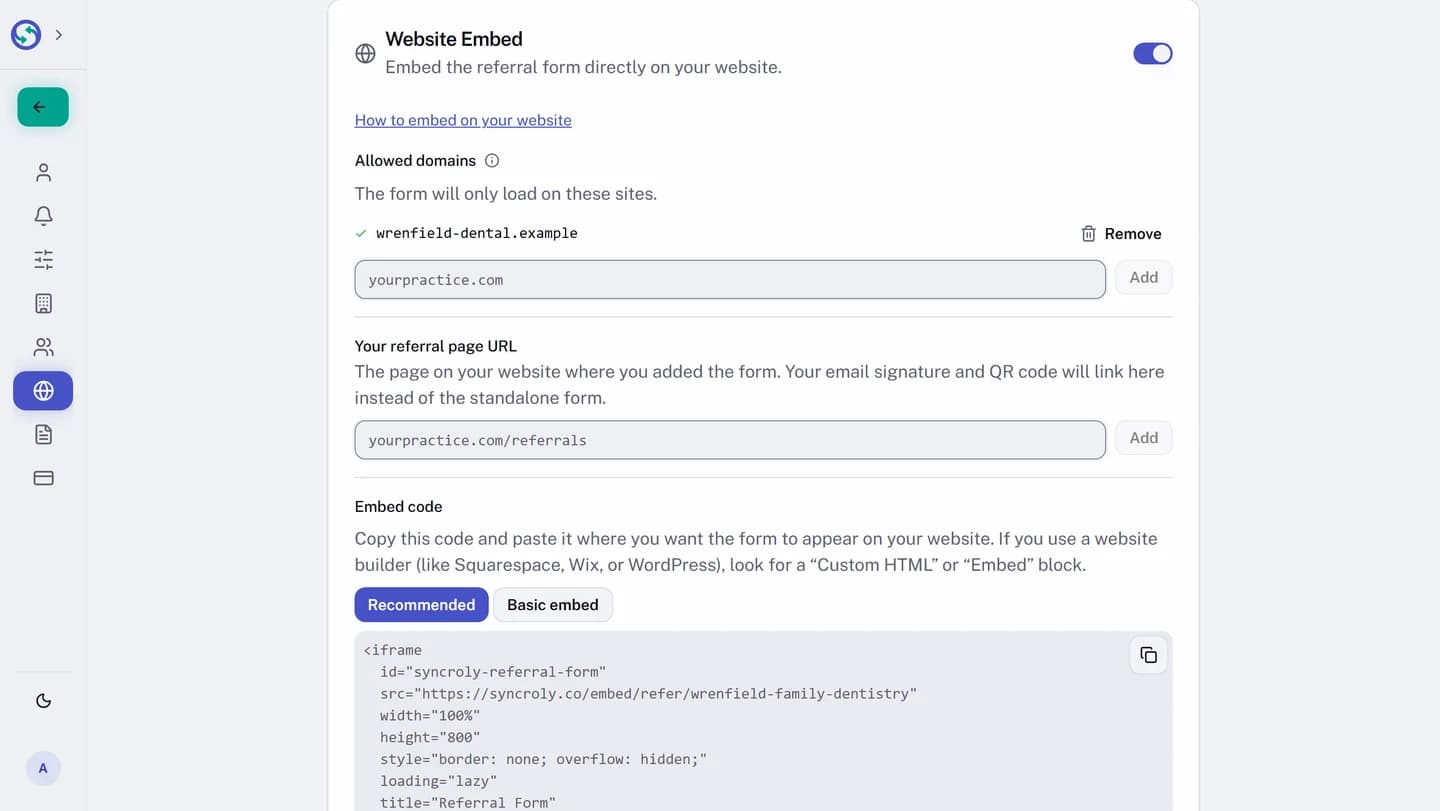
Turning the switch on opens the embed options underneath it: the domains the form may load on, the code to paste, and a link to the full instructions.
Allow the websites that may load the form
For security, the embedded form loads only on websites you list under Allowed domains. Type a domain and select Add; remove one with Remove. If you filled in your website in general settings, Syncroly suggests it for you when you first turn the embed on.
Until at least one domain is on the list, the page holds the code back and reads Add a domain to see your embed code.
Copy the code onto your site
Once a domain is listed, the Embed code appears with two options. Recommended adjusts the form height to fit your page. Basic embed uses a fixed height; use it if the recommended code does not display correctly on your site. Copy the one you want, and paste it where the form should appear.
Most website builders take this through a block for custom code. On builders such as Squarespace, Wix, or WordPress, look for a Custom HTML or Embed block and paste the code there. If your platform has no such block, use the direct link instead.
Open the instructions written for your practice
The Website Embed card carries a link, How to embed on your website, that opens a page written for your own form, with platform-by-platform steps and your practice already filled in. It is tied to your account, so it opens only from this card, in a new tab, and only for an Owner or Administrator. There is no public address for it.