See who refers to you, and who has gone quiet
The Relationships page now shows which practices have stopped referring to you, and the referrals behind every number. It also adds a map of your referral network and a thank-you list you can print.
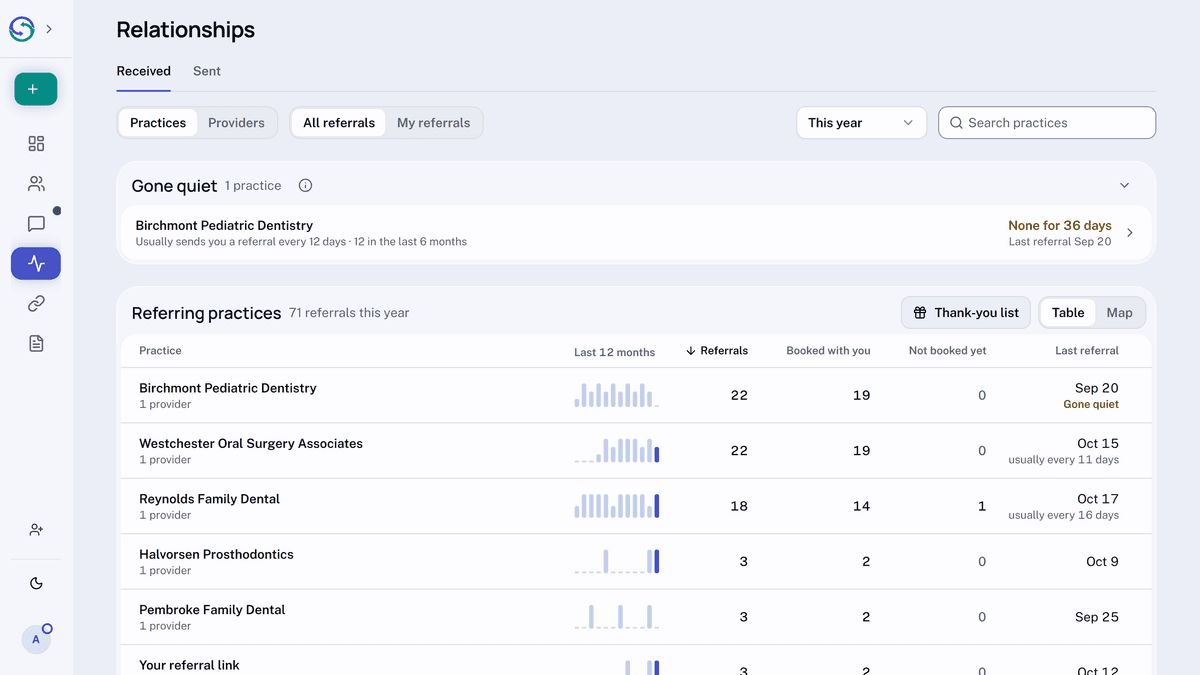
In the sidebar, open Relationships. Select a row on Received or Sent to see the referrals behind its numbers. On a wide screen, each row also has a bar for each of the last 12 months.
On Received, above the table, Gone quiet lists the practices that used to refer to you regularly and have stopped, with how long it has been since each one's last referral.
At the top right of the table, Map places the same practices around yours, with rings in miles. It appears once your practice and at least four practices on that tab have an address on file.
On Received, Thank-you list makes saying thanks easy: it lists the practices that sent you patients, most booked first, with their addresses, ready to download or print.